For too many businesses, mail management is still manual, repetitive work that pulls talented people away from the work they were actually hired to do.
Between sorting, scanning, figuring out who needs what, following up on what goes missing, and depositing checks, what should be a simple back office task turns into a tedious and time consuming process. And because mail arrives and is processed sporadically, it’s easy to underestimate the cost.
Until it isn’t.
According to recent research from Stable, 88% of teams say physical mail interrupts higher-value work. For mid-size and enterprise businesses, that number climbs to 96%.
But the real problem isn’t the envelope, it’s everything that happens after it.
Every important piece of physical mail initiates another business process. That’s why simply digitizing mail isn’t enough.
Modern businesses realize that the true power comes from automating business mail management end-to-end: making physical mail accessible from anywhere, instantly understanding what it is, routing it to the right people, integrating it with the systems your business already uses, and moving forward automatically.
In other words... Mail shouldn’t be work. Mail should work.
Modern businesses run on automated workflows, except when it comes to physical mail. Critical documents still rely on manual sorting, scanning, routing, and processing before work can begin.
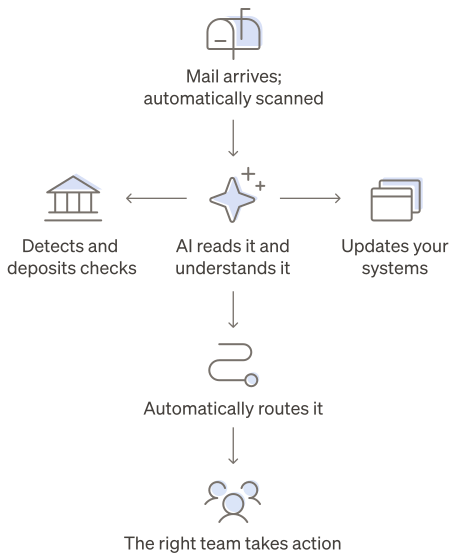
Digitizing mail is not the same as automating it. End-to-end automation digitizes mail on arrival, reads it with AI, routes it to the right person, and pushes it into the systems a business already uses, before anyone physically opens an envelope.
Automated mail management works through a handful of mechanisms: instant digitization, automated routing, AI-generated summaries, automatic check deposit, and integrations with existing tools.
The payoff shows up as reclaimed hours. Businesses using Stable report saving an average of 20 or more hours a month, and some have cut mail handling time by 90%.
Automation also reduces risk — fewer lost documents, missed deadlines, and compliance gaps — and it scales as mail volume grows without adding headcount.
Old way: Mail is work
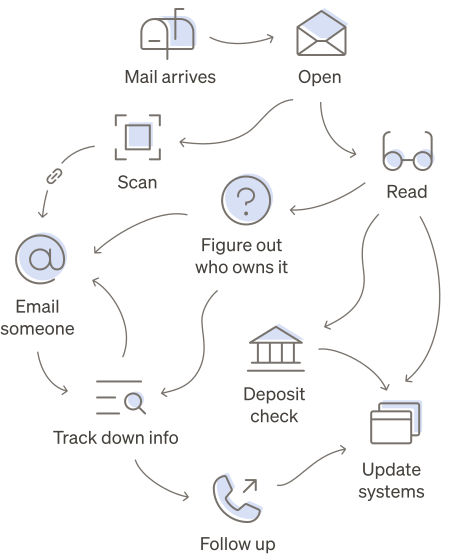
New way: Mail works for you
Why mail is still work
When we say “mail is work”, we don’t just mean opening envelopes.
Mail still sits in an awkward place within most organizations. Whether we like it or not, mail remains physical… but the work it triggers now lives in the digital realm.
Most teams are not managing mail manually by choice. They are simply stuck in between. They may scan or take pictures of the mail, but someone still has to open it. They may upload PDFs into their systems, but someone still has to name the file, notify the right person, and remember to follow up. They may have a spreadsheet to track everything, but someone still has to keep it updated.
And mail is not the only place this happens. Asana’s research found that employees spend about 62% of their workday on mundane, recurring tasks, and only 27% of their time on the work they were actually hired to do
Mail management is one of the clearest examples of this: necessary but predictable, rules-based work that keeps pulling people away from tasks that matter.
What your team could be doing instead
One of the biggest dangers of manual mail management is not the time spent handling it, but what that time could be spent on. In plain terms it is the opportunity cost.
As businesses become more complex — opening new locations, securing more customers, dealing with more complicated regulations — mail management becomes more complex too. Employees spend an increased amount of time managing, tracking down, and following up on important mail as volume grows.
And the broader case for automation is clear. McKinsey has found that 60% of employees could save 30% of their time with workflow automation. Additionally, manual data entry (think: copying information from an invoice into a system of record) has a measurable cost. Parseur research shows that U.S. businesses lose an average of $28,500 per employee each year to manual data entry, with employees spending more than nine hours per week transferring information across systems.
of employees could save 30% of their time with workflow automation (McKinsey)
lost per employee each year to manual data entry (Parseur)
Mail creates the same kind of operational drain. Take this example:
A check arrives in the mail. First, someone has to collect it, then they open the envelope, identify what it is, confirm who it’s from, record the amount, notify finance, deposit the check, update the accounting system, reconcile the payment, and archive the document for future reference.
None of those steps create value for the business by doing them manually, nor are they a good use of an employee’s time. But every single one of them has to happen before the business can actually use the money.
With automated mail management, that same check is digitized, identified, deposited on receipt, routed to finance automatically, integrated with your system of record, and the right people are notified immediately. What used to require multiple manual handoffs becomes a workflow that runs itself.
The same is true of the invoice and the tax notice. Once mail becomes an automated workflow instead of a manual task, the process that used to start with an envelope simply moves forward on its own.
The risk you don’t see until it’s too late
Time is one issue when it comes to manual mail management, but risk is another.
Business-critical information often arrives by mail, and it is hard to spot a problem until something has already gone wrong. You often don’t know you missed a deadline until a fee arrives, or that a check was never processed until finance goes looking for it.
Aiven, a global data and AI platform company, experienced this firsthand. Using a registered agent service for mail management before switching to Stable, mail “would arrive late 100% of the time,” creating risk around tax notices, compliance deadlines, and other time-sensitive documents.
According to Stable’s latest research, 45% of teams say they have missed a deadline because of mail, and 21% say it has happened more than once. Another 28% say it has not happened yet, but it is a real concern.
That means more than 70% of teams are either already experiencing mail-related risk or actively worried about it.
Automated mail management closes that blind spot. Mail is digitized and identified the moment it arrives, so time-sensitive documents surface immediately, get routed to the right person, and leave an audit trail… instead of sitting unseen until a fee or a missed deadline makes the problem visible.
of teams are either already experiencing mail-related risk or actively worried about it.
Why teams are automating mail management now
The appetite for automation is already here. According to Stable research, 73% of teams say they are interested in using AI and automation to handle mail management.
This tracks with a broader mandate to modernize operations. According to Gartner’s 2026 research, 80% of CEOs expect AI to force meaningful change to their operational capabilities.
of CEOs expect AI to force meaningful change to their operational capabilities.
The “AI mandate” is no longer theoretical, or on the horizon. It is a clear priority for almost every organization. The question becomes: which manual workflows are still slowing them down?
Mail is an obvious place to start.
Teams do not want more tools. They want mail to move through the tools they already use: with AI summaries, automated routing, searchable archives, instant check deposit, and integrations built in.
And the teams that make that shift are not only saving valuable hours, they spend them on the work that actually grows the business.
Mail should work. Here’s what that looks like.
When businesses stop treating mail management as a manual task and start treating it as an automated workflow, the impact reaches far beyond the mailroom.
How to automate business mail management
When mail is automated, it stops being something your team manages and starts becoming something that manages itself.
Darwin Homes COO Rich Bowen put it simply: “We are a great property management company — we’re not a mail company. So let’s partner with people who do this well so we can focus on what we do best.”
The goal with automated mail management is to completely remove the daily operational burden — not just make the process slightly easier. Here is what good automated mail management looks like, and how to implement it:
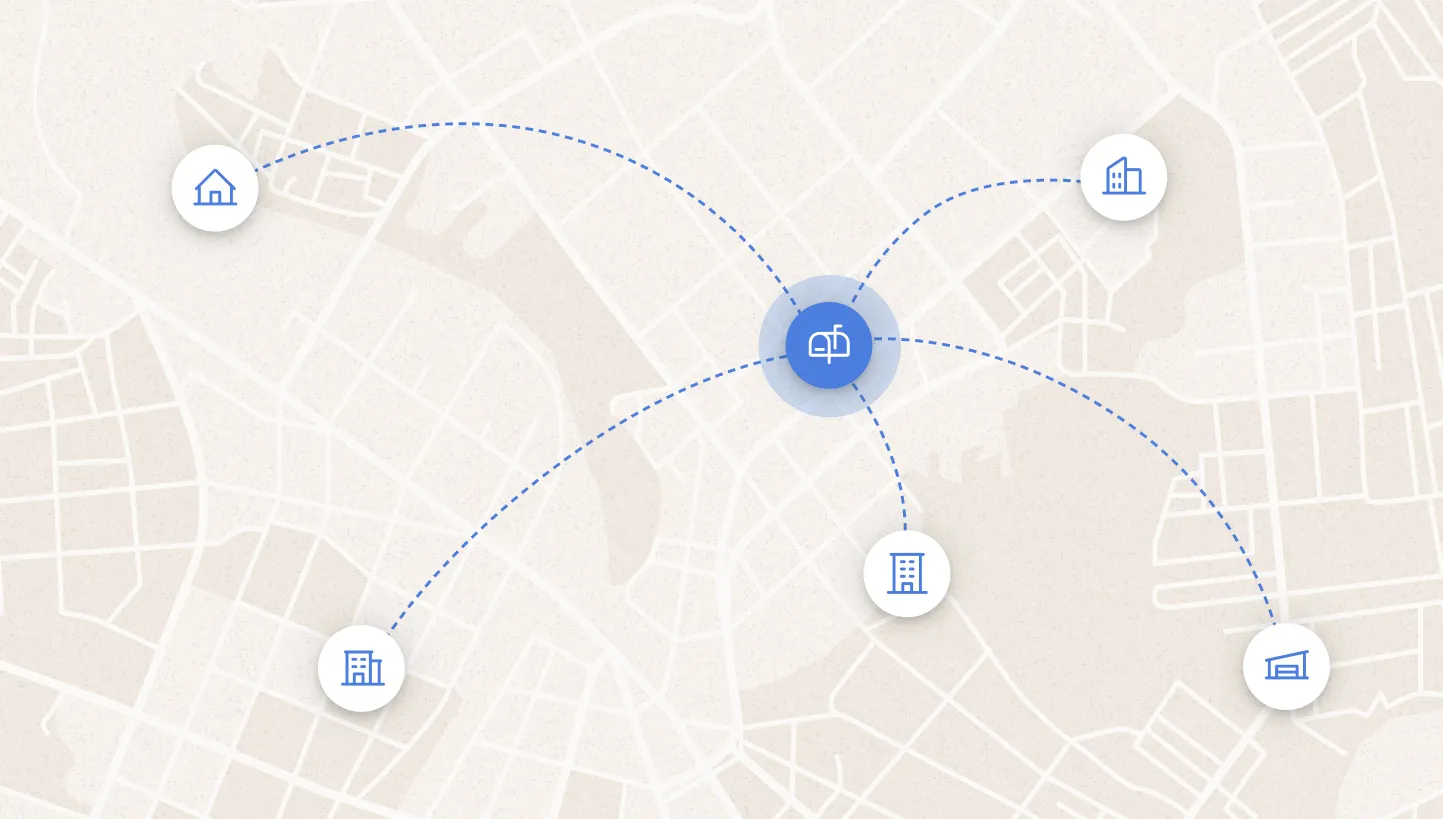
1. Centralize where mail goes
The first step is simple: stop letting mail scatter across offices, home addresses, coworking spaces, registered agents, and old business locations.
A centralized virtual business address gives every team, entity, and location one reliable place for mail to land — and change of address support makes the switch painless. That matters for remote teams, but it also matters for in-office and hybrid teams managing multiple business names, legal entities, locations, or departments.
For founders, this solves the “what address do we use?” problem before it becomes a recurring administrative mess. FlowGen Labs saved more than 30 hours by avoiding repeated address changes as the founders moved apartments and offices. Send’s founder, Neil Gandhi, used Stable across multiple startups because he needed a permanent address that would not change every time he moved.
For growing businesses, centralizing mail creates consistency as operations become more complex. As AutoCamp expanded from a handful of locations to a national hospitality brand, they needed one place for mail to arrive and one workflow for managing it. Instead of juggling mail across properties and offices, every piece now flows through a centralized system, helping reduce turnaround times from one to two weeks to just 24–48 hours.

2. Digitize mail as soon as it arrives
Once mail routes to one place, it needs to become digital — fast.
That means every piece of mail is received, scanned, and uploaded to a virtual mailbox where it’s accessible online. Not at the end of the week, not once someone has time, not after a manual pickup… instantly. That timeline could be the difference between missing a deadline and staying ahead of the curve.
Darwin Homes experienced the consequences of speed firsthand. With their previous provider, important mail took up to two weeks to be available online, causing delayed action on time-sensitive mail like legal notices, checks, and HOA violations. After making the switch to Stable, every piece of mail was available in their dashboard within one business day, enabling real-time visibility and allowing them to respond within hours instead of weeks.
Digitization is the foundation to successful mail management. It gives teams visibility, prevents documents from sitting in piles, and lets employees act on it from anywhere.
But digitization alone is not enough. A PDF sitting in a dashboard still requires a person to decide what it is, who needs it, and what happens next. That is where automation starts.
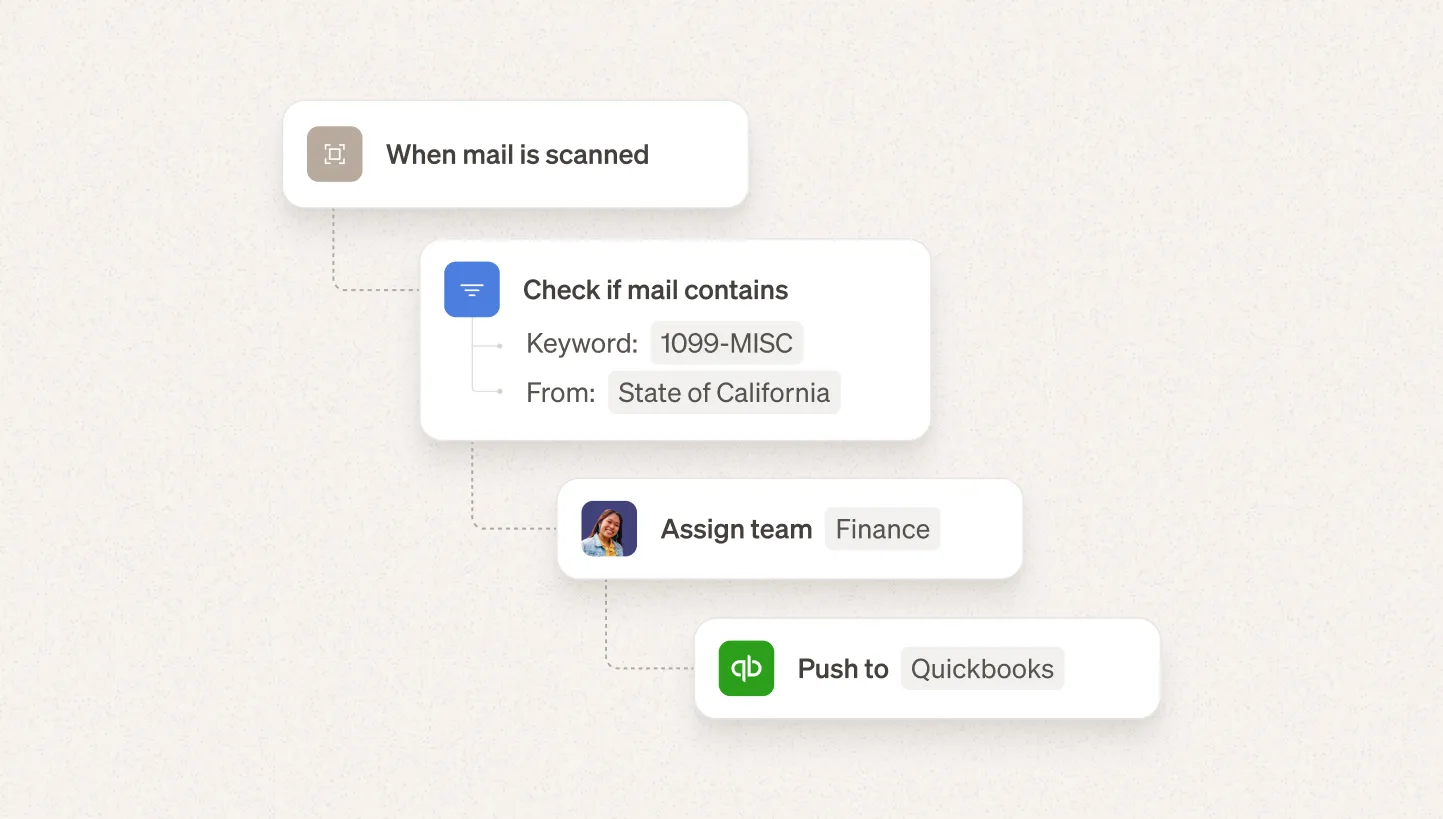
3. Automate repetitive mail tasks
Traditional mail management requires someone to make the same decisions time and time again. Should this be forwarded, deposited, routed, archived… is it even important or is this just junk?
Mail management automation removes that repetitive work all together.
Instead of asking an employee to manually process every piece of mail, businesses now have the ability to define rules once, and let them run automatically. Mail can be routed to the right team based on the sender, recipient, document type, or keywords. Checks can be automatically deposited into your bank account upon receipt. Physical mail and packages can be forwarded to the right location on a schedule or when storage deadlines are reached. Junk mail can be identified and filtered out before anyone ever has to look at it.
This is where mail stops being a collection of manual tasks and starts behaving like every other modern business workflow.
At AutoCamp, automation eliminated the need for employees to manually sort every piece of incoming mail. Auto-routing rules now categorize and deliver mail to the appropriate team automatically, while scanning and tagging make every document easy to find later. The result is five to seven hours saved every week and more time spent on business operations instead of administrative work.

4. Let AI do the first read
Mail creates work because someone has to understand what is inside.
But AI is changing that. Instead of reading every document, opening every scan, and manually deciding what matters, teams can see the key information faster with AI summaries: what the item is, who it is from, what it concerns, and what action may be needed.
This is especially valuable for high-volume teams dealing with invoices, checks, notices, claims, forms, legal documents, and tax mail.
Manual document processing is expensive. Parseur reports that manually processing a document costs businesses an average of $12.88, while AI-powered automation can bring that cost down to as little as $2.36.
Humans are still necessary for judgment-heavy work. But AI can prevent wasted time on repetitive reading, sorting, and data entry that should happen automatically.
5. Connect mail to the systems that run your business
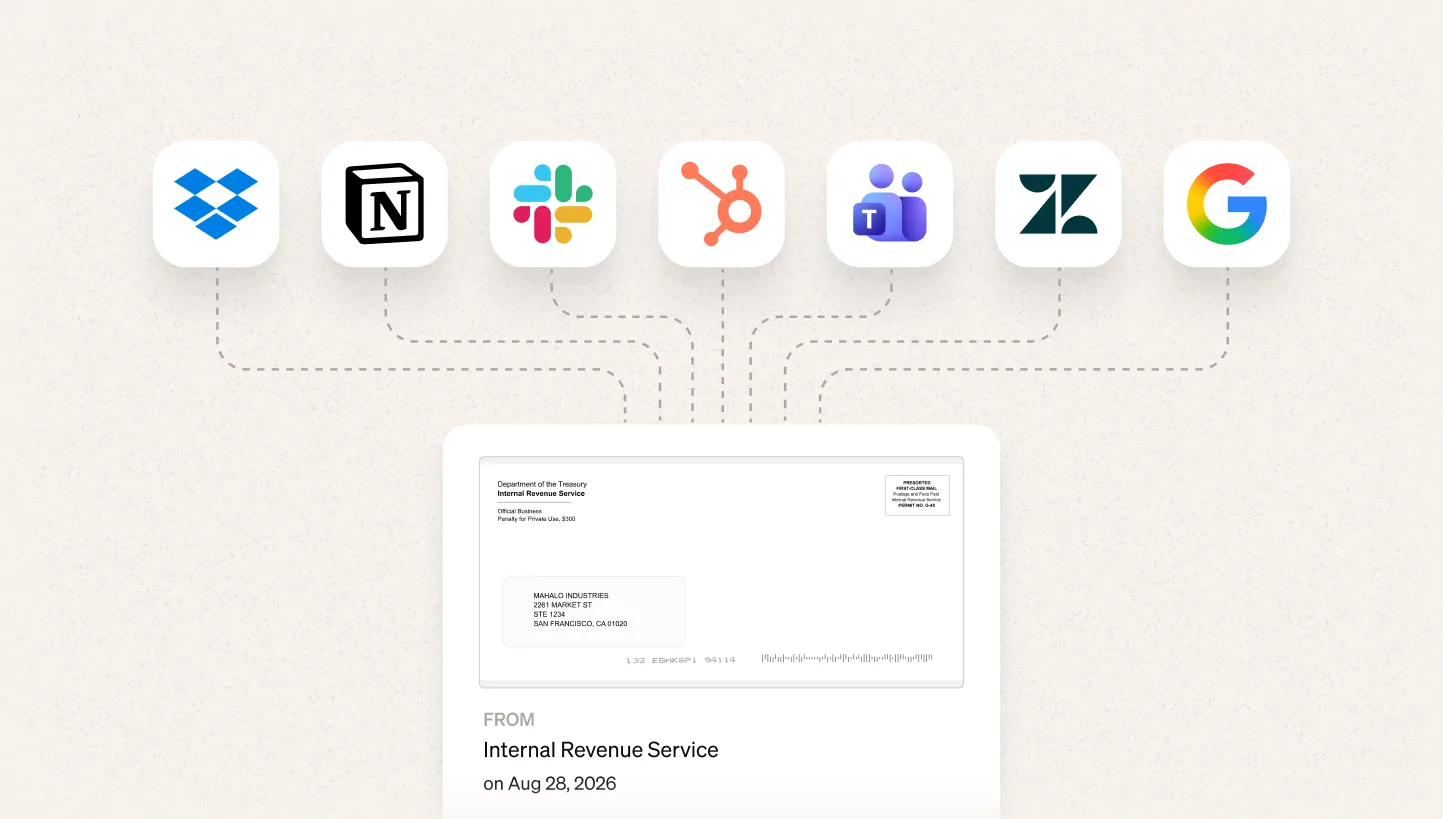
Given how most businesses currently process mail, it can often feel siloed. Even after it’s digitized, mail tends to just sit there — a scan in a portal or a PDF in an inbox — disconnected from where the work actually happens. But the best automated mail management connects physical mail to the systems teams already use: Slack, accounting tools, ERPs, or proprietary workflows to name a few.
Darwin Homes uses Stable’s API and webhooks to automatically route mail into its proprietary management software, allowing teams to act on checks, eviction notices, HOA violations, and other time-sensitive documents without leaving their existing workflows. The result was a 90% reduction in mail processing time, 98% classification accuracy, and dramatically less manual coordination between teams.
This is where mail stops being work and starts working.
Instead of someone manually interpreting every envelope and deciding what happens next, mail automatically triggers the right workflows in the background. The appropriate people are notified, the relevant systems are updated, and the right actions happen, often before anyone has to think about them.
6. Keep business mail secure, accessible, and accountable
Once mail has been digitized and automated, businesses still need confidence that it’s being handled securely from beginning to end.
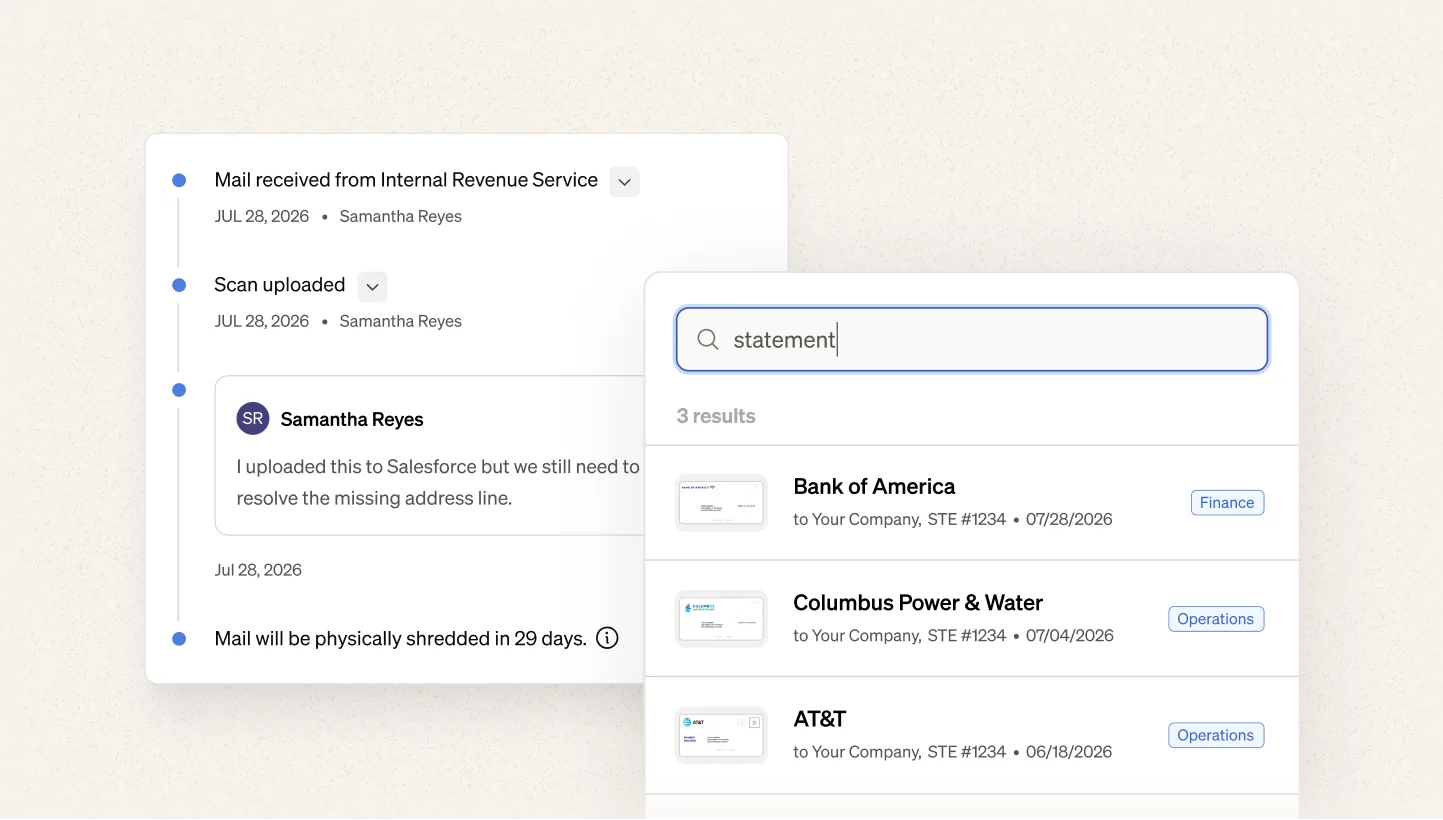
That means knowing physical mail can be forwarded when you need the original, securely shredded when you don’t, and stored in a searchable digital archive that preserves every document and every action taken. Instead of relying on filing cabinets, paper trails, or someone’s memory, your organization has a permanent, auditable record of its business mail.
Farmers Business Network wanted confidence that every piece of mail had been received, reviewed, and accounted for. With Stable’s searchable archive and complete audit trail, the team can quickly verify the status of any document, reduce lost mail, and know exactly what happened to it, even months later. “I like that I can go back and look at old mail records, make sure I looked at it, and make sure the matter was closed,” said Lynn Bailey, Head of Facilities & EHS.
What teams do with the hours they get back
The hours reclaimed when automating mail management not only mean valuable time saved. They mean more valuable work that becomes possible again.
The pattern is consistent:
Mail does not disappear. The manual, repetitive, and tedious work does.
When mail starts working, people get their time back.
20+ hours back every month
“I'm now able to better support the CEO in executing his vision, and since he has a better support system, that trickles down to the rest of the company.”
Office Manager, Andros
5–7 hours reclaimed every week
“It's really freed me up to do less administrative tasks and focus more on business operations.”
Executive Partner to the CEO, AutoCamp
More confidence to keep growing
“I see new locations opening and realize we don't need to worry about changing our address again. We're good.”
Controller, Havenwood Academy
Make mail work, so your team can focus on what matters.
80% of teams say digitizing operational processes is a priority, and mail is an obvious place to start.
With mail scanning and digitization, AI summaries, automated routing, electronic check deposits, digital archives, and integrations with the systems your team already uses, Stable transforms physical mail into a workflow that works automatically.
So your team can stop working on mail. And mail can start working for them.
Related resources