
For distributed teams, physical mail is the last operational bottleneck, and digitizing it with a virtual address is what makes a true digital HQ possible.
Physical offices dominated the business world for decades, but business environments are becoming increasingly digital. While communication tools are common, physical mail remains a significant tether to a physical location.
Digitizing physical mail is the missing piece for teams that want to operate from anywhere. Learn how creating a digital HQ makes managing distributed teams easier and gives your business the freedom and flexibility to grow.
Key takeaways
- A digital HQ is a centralized hub that brings distributed teams together, providing access to communication tools, digital mail, and important documentation.
- Enterprises can maintain 50-state compliance, enhance flexibility, and simplify operations by outsourcing and digitizing mail.
- Digital mail is instant and accessible from anywhere, making it an ideal choice for distributed work teams.
- Stable simplifies the digital HQ transition by consolidating your mail and helping you maintain good standing and compliance across all 50 states.
What is a digital HQ?
A digital HQ is an online environment that replaces physical offices for distributed teams. Creating a digital HQ allows you to centralize mail and other operations across a multi-state organization, which is essential for enterprises that rely on fully remote work.
Effective digital HQs consist of several core components that combine to create a virtual office environment. These tools for distributed teams include:
- Communication: Apps like Slack and Microsoft Teams allow distributed teams to communicate and collaborate in real time.
- Virtual address: A virtual address gives your business a permanent, professional mailing address that isn't tied to a lease, a home, or any single team member's location. It's the fixed front door your business needs for state filings, banking, and daily correspondence, without requiring anyone to physically be there.
- Digital mail: Virtual mailboxes replace physical mail in a digital HQ, giving you a centralized mailbox where you can view and organize your mail. Important mail like tax correspondence and legal notices can be immediately scanned and forwarded to the proper department.
- Knowledge: Centralized documentation and knowledge bases provide a consistent point of reference for company guidelines and processes.
- Project management: Project management software helps convert projects into organized lists of tasks that teams can use to stay on track.
The risk of physical mail in a distributed environment
Physical mail management works for some businesses, but it’s not ideal for distributed team management. When you optimize mail operations, it helps mitigate some of the risks of using physical mail in a distributed work environment.
Information silos and delays
Enterprises have a lot of physical mail to process, and some of that mail is time-sensitive. When you’re receiving physical mail at an office, there are several ways that mail might not make it to its intended recipient in time.
Let’s say you’re using your home or office address as your registered business address. Physical mail can pile up quickly in these locations, and larger volumes of mail make it harder to weed out the important stuff. As a result, you could have critical documents sitting in a messy pile of mail at your home or physical office. When you need these documents, they can be difficult or even impossible to find. Digital mail eliminates this problem by centralizing and organizing your mail so it’s easy to manage.
Physical mail is an even bigger risk for time-sensitive mail like legal notices or state compliance documents. If you’re required to respond to mail by a certain deadline but you don’t know you received that mail, you’re putting your business at risk.
Security and privacy gaps
Some physical mail contains sensitive business data, and that can be an issue depending on how you receive mail. If an unauthorized person in the office is handling sensitive business documents, that sensitive information is at risk. This is also the case with unsecure mail forwarding.
If you use your home address for business filings, you’re exposing your home address to the public and inviting an influx of junk mail. A virtual address solves this directly. Instead of listing a home or leased office in public state filings, your virtual address becomes the business's official location on record, keeping personal information private and your mailbox clear of business correspondence.
Operational friction
Even if you’re receiving physical mail and digitizing it on your own, traditional mail can result in significant operational friction.
Scanning and uploading mail is a tedious process, especially when you’re receiving large volumes of physical mail. This manual process slows down response times for the entire team, and it’s even worse when you’re dealing with time-sensitive mail.
Reducing operational friction is a key part of managing distributed teams because there are so many moving parts. When a single team is impacted by the manual process of digitizing mail, it creates a ripple effect that also slows down other teams.
Why enterprises outsource and digitize company mail
Larger companies simplify managing distributed teams by outsourcing and digitizing company mail. This digital transformation offers several benefits for enterprises.
Centralizing the source of truth
When you outsource and digitize company mail, every piece of physical mail is scanned, indexed, and made searchable by anybody who’s part of the authorized team. When a team member needs to find an important document, they can find it in a matter of seconds. As a result, distributed teams have easy access to the resources they need.
You can also set up your digital HQ so alerts are automatically sent via Slack and email to instantly notify stakeholders. Integrating your virtual mailbox with the other digital HQ tools you rely on makes the whole process seamless, so teams can spend more time focusing on important projects.
Maintaining 50-state compliance
Remote work compliance can be a challenge when you operate in several states. As an LLC, you’re required to have a physical address in the states where you operate, that way you have a reliable point of contact for state communication. Typically, you’d need to have a physical lease to meet these requirements.
Outsourcing and digitizing mail gives you a physical point of contact in each state where you operate. For daily correspondence, banking relationships, and non-legal filings, a virtual address satisfies the physical presence requirement without a lease.
Additionally, LLCs are required to have a registered agent in all states where they operate. This is a legal requirement, not just a best practice. A registered agent accepts service of process on your behalf, meaning they're the official point of contact for lawsuits and state compliance documents. A virtual mailbox alone doesn't satisfy this requirement. With Stable, you get both under one roof: registered agent coverage for legal compliance and a virtual mailbox for all other business correspondence, with everything surfacing in the same dashboard so nothing falls through the cracks.
Flexibility and freedom of movement
Flexibility is one of the most valuable things you can have as an enterprise, but that’s easier said than done. Strict compliance requirements can make it difficult to keep everything in order as your business changes and grows, especially when you’re relying on traditional mail.
When you have a centralized virtual mailbox and registered agent, you don’t have to worry about updating state filings every time a core team member moves or the company changes its remote setup. This gives you the freedom to make changes that benefit your company without worrying about the impact it’s going to have on compliance and daily operations.
Traditional mail vs. Digitized mailroom
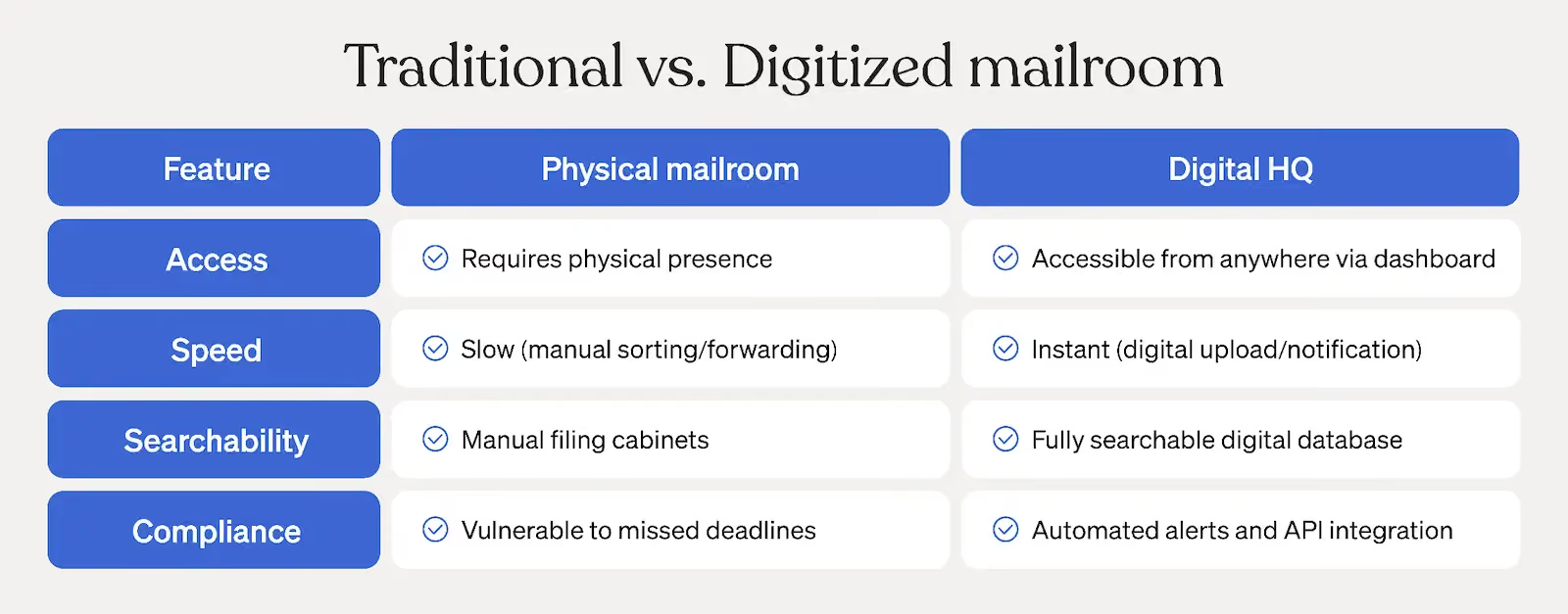
How Stable simplifies the digital HQ transition
Transitioning to a digital HQ may seem overwhelming, but it can transform the way your business operates. Stable makes the digital HQ transition simple by consolidating all your state mail and legal notices into one digital dashboard, so everything is easy to find.
With Stable, everything your distributed business needs to operate — and stay compliant — lives in one place.
Your virtual address serves as your business's official location for state filings, banking, and daily correspondence, without tying you to a lease or exposing anyone's home address in public records. Paired with registered agent coverage across all 50 states, your compliance footprint is fully accounted for whether you're operating in two states or twenty. And as your business grows into new markets, Stable scales with you.
Every piece of mail that comes in is scanned, indexed, and instantly accessible from your Stable dashboard. AI-powered transcription means your team isn't waiting on manual processing, and automatic routing sends each piece of mail to the right person or department the moment it arrives, no integrations required.
For distributed teams, that kind of visibility changes how the whole organization operates. When legal, finance, and ops all have eyes on the mail that matters to them, without anyone manually forwarding documents or chasing down correspondence, the last manual bottleneck in your workflow disappears. That's what a true digital HQ looks like.
Contact our sales team to learn more about Stable and find out how you can get started with the digital transformation.
Frequently asked questions
How does digitizing mail improve remote productivity?
Digitizing mail improves remote productivity by ensuring important correspondence, like legal notices, compliance documents, and checks, gets to the right person the moment it arrives — not days later. Digital mail also eliminates the process of manually scanning and uploading documents.
What are the cybersecurity risks of a distributed workforce?
Distributed work environments face several cybersecurity risks, including unsecured handling of sensitive documents and business information exposed through public filings. Digital mail reduces these risks by centralizing all correspondence in a secure, access-controlled platform, so sensitive mail isn't sitting on someone's desk, getting lost in a personal inbox, or tied to a home address that's visible in public records. With role-based access and a clear audit trail of who viewed what, your team has visibility without compromising security.
Can I use a residential address for my business filings?
You can use a residential address for your business filings, but it comes with real drawbacks. Business addresses are public record, which means your home address becomes searchable by anyone. Beyond the influx of unsolicited mail, you're also blurring the line between your personal and professional life in a way that's difficult to undo. A virtual address keeps your home address private, maintains a clear separation between personal and business correspondence, and gives your business a professional presence without any of the exposure.