
Enterprise organizations can eliminate manual data entry, reduce errors, and scale their mail operations by adopting intelligent document processing (IDP) paired with a centralized virtual mailbox platform.
Enterprise organizations process thousands of pieces of mail every week. Invoices, checks, legal notices, and customer correspondence all flow through physical and digital channels, and most of it still gets handled manually. That means data entry teams spend hours on repetitive tasks, while errors pile up and bottlenecks slow down operations. Intelligent document processing (IDP) offers a practical way to automate that work, reducing costs and speeding up turnaround across the board.
Keep reading to learn how IDP works, where manual mail processing falls short, and how the right platform can streamline enterprise mail operations from intake to action.
Key takeaways
- Intelligent document processing uses AI and machine learning to extract, classify, and route data from enterprise mail automatically.
- Digital mailroom automation reduces labor costs, error rates, and processing times at scale.
- IDP goes beyond traditional optical character recognition (OCR) by learning from data and handling unstructured documents.
- Pairing IDP with a centralized virtual mailbox platform creates an end-to-end automated workflow.
What is intelligent document processing (IDP)?
Intelligent document processing is a combination of AI technologies that capture, classify, extract, and validate data from documents. IDP uses machine learning, natural language processing (NLP), and optical character recognition (OCR) to handle both structured and unstructured content without manual intervention.
In simpler terms, IDP reads your mail, figures out what each document is, pulls out the relevant data, and sends it where it needs to go. For enterprises dealing with high mail volumes, this means eliminating the need for manual data entry across invoices, contracts, claims, and other document types.
How IDP works
At a high level, intelligent document processing follows a series of steps to move documents from intake to action. Here’s how the process typically breaks down:
- OCR (optical character recognition): IDP starts by scanning physical or digital documents and converting them into machine-readable text.
- AI-based classification: Machine learning models sort each document by type..
- Data extraction and validation: The system pulls specific data points from each document. This can be things like vendor names, PO numbers, totals, and line items, then validates that data against existing records.
- Workflow automation: Once data is extracted and validated, IDP routes it through predefined workflows for approval, exception handling, or storage.
- Integration with ERP/AP/CRM systems: Extracted data can sync with enterprise systems of record, eliminating the need for manual re-entry.
IDP vs Traditional Optical Character Recognition (OCR)
Traditional OCR has been around for decades, but it has clear limitations when it comes to enterprise-scale mail processing. Here are the main differences between IDP and legacy OCR:
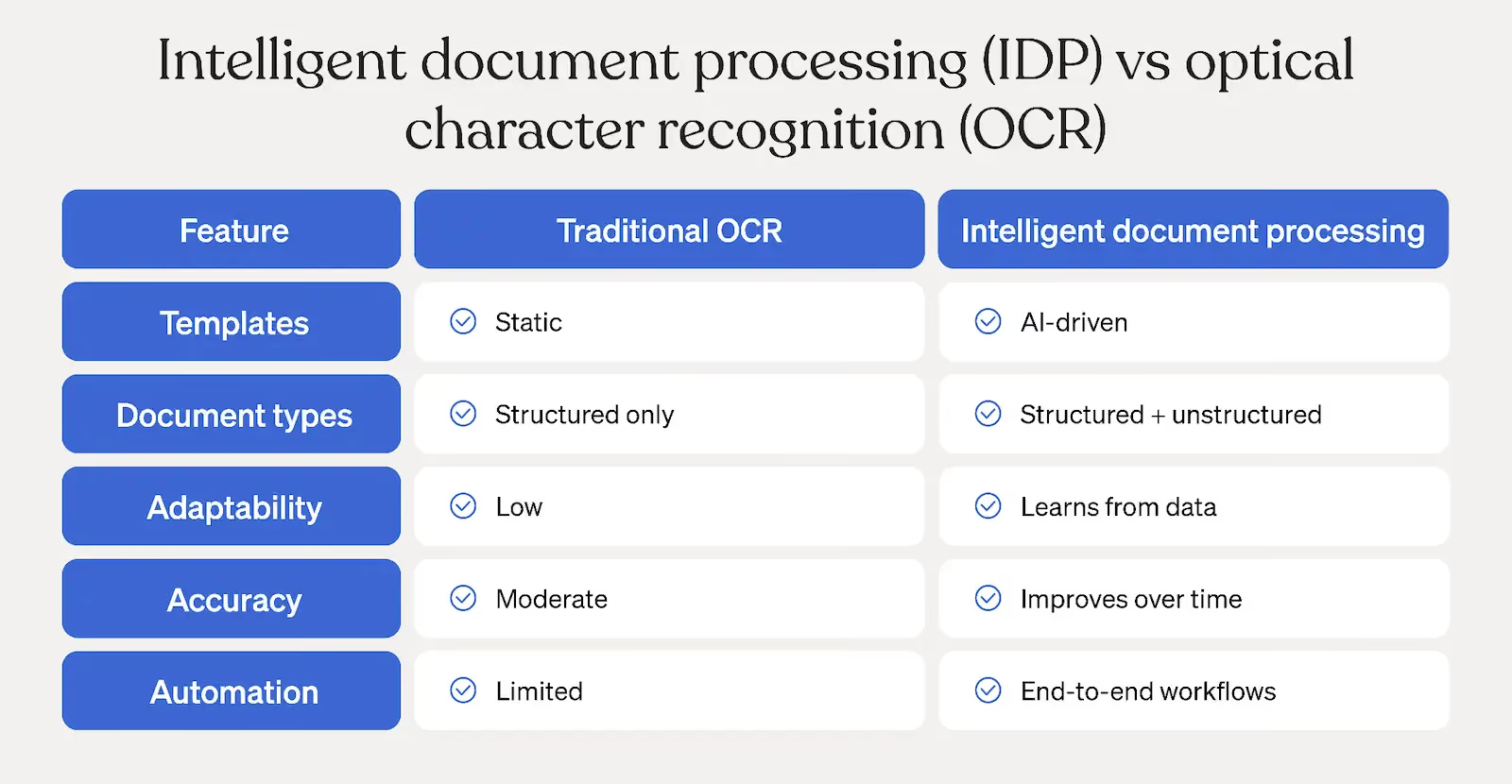
- Static templates vs. machine learning: Traditional OCR relies on fixed templates to read documents. If a document layout changes even slightly, the system may not work properly. IDP uses machine learning to adapt to new formats without manual reconfiguration.
- Structured vs. unstructured documents: OCR works best with structured documents that follow a predictable format. IDP handles both structured and unstructured content, including handwritten notes and free-form correspondence.
- Continuous learning capabilities: Legacy OCR doesn’t improve over time. IDP systems learn from corrections and new data, getting more accurate the longer they run.
Challenges of enterprise mail processing at scale
Even well-staffed mailrooms hit a ceiling when volume grows. Without digital mailroom automation, enterprises face a range of operational issues that compound over time, such as:
High labor costs
Large organizations often dedicate entire teams to data entry and document processing. During peak periods like quarter-end or tax season, overtime costs spike. For companies managing a high-volume mailroom, these expenses add up fast.
Error rates and rework
Manual keystroke errors are inevitable when people process hundreds or thousands of documents per day. Invoice mismatches, incorrect data entries, and missed compliance deadlines all lead to rework, delayed payments, and potential regulatory penalties.
Slow processing times
Backlogs are a constant challenge in manual mail operations. When documents sit in a queue, payments get delayed, vendor relationships suffer, and internal teams lose productivity chasing down paperwork.
Lack of visibility
Without a centralized system, tracking the status of a specific document becomes guesswork. Audit preparation takes longer, and there’s no reliable way to measure processing performance or identify bottlenecks.
How IDP transforms high-volume enterprise mail
When paired with the right infrastructure, intelligent document processing addresses each of these challenges directly. Here’s how IDP applies to enterprise mail operations:
Mail digitization
Everything starts with centralized mail intake. Physical mail gets scanned and converted to digital files, while electronic mail feeds directly into the system. Integration with an enterprise virtual mailbox platform ensures that all mail, regardless of source, enters a single pipeline for processing.
Automated document classification
Once digitized, IDP can automatically categorize each piece of mail. Common classifications include:
- Invoices
- Checks
- Legal notices
- Claims
- Customer correspondence
This process eliminates the manual sorting step and ensures documents reach the right workflow immediately.
Intelligent data extraction
IDP pulls structured data from each document type. For invoices, that means line-item details, vendor names, PO numbers, and totals. For contracts, it can capture relevant terms, dates, and obligations. The system validates extracted data against existing records to flag discrepancies before they become problems.
Workflow routing
After extraction, documents move automatically through approval chains, exception queues, and ERP sync processes. Data flows directly to systems of record, so finance, legal, and operations teams can act on it without waiting for manual handoffs.
Continuous learning
IDP systems tend to improve their accuracy over time. As the AI processes more documents and receives corrections, it refines its classification and extraction models. This means fewer exceptions and less manual review the longer the system runs.
Key benefits of IDP for enterprise mail operations
The operational impact of enterprise mail automation shows up across multiple areas. Here are the most significant benefits:
Cost reduction
Automated digital mailroom processing reduces dependency on large data entry teams. Overtime costs during peak periods drop significantly, and organizations can reallocate staff to higher-value work. Companies focused on efficiency at scale often see measurable ROI quickly.
Accuracy and compliance
Error rates drop substantially when manual data entry is removed from the equation. Built-in audit trails provide clear documentation for compliance purposes, and validation rules catch discrepancies before they reach downstream systems.
Faster turnaround times
Invoice processing cycles shorten from days to hours. SLA performance improves, and finance teams gain the ability to capture early payment discounts that were previously lost to processing delays.
Scalability
IDP handles seasonal volume spikes without additional headcount. Multi-location consolidation is more straightforward when all mail flows through a centralized automated digital mailroom.
Improved visibility and reporting
Real-time dashboards give operations leaders clear insight into processing status, throughput, and exception rates. Analytics tools help teams identify patterns and opportunities for further optimization.
How Stable enables intelligent enterprise mail automation
Stable provides the infrastructure that makes enterprise mail automation practical at scale. Here’s what the platform offers:
- Virtual mailbox infrastructure: Stable’s virtual mailbox platform gives organizations a single digital intake point for all incoming mail, regardless of source or format.
- Centralized digital mail intake: Physical and electronic mail flows into one system, eliminating the need to manage multiple mailrooms or intake processes across locations.
- Data extraction: Stable has the ability to handle data extraction directly within the platform, pulling relevant information from every document that comes through. From there, extracted data can integrate with your existing enterprise tools through Stable’s automations and API connectivity.
- Secure storage and compliance: Documents are stored with encryption and access controls that meet enterprise compliance standards.
- API connectivity to enterprise systems: Stable can connect to ERPs, AP platforms, CRMs, and other systems of record through our open API and webhooks, so extracted data flows where it needs to go without manual effort.
- Enterprise-grade controls: Role-based permissions, audit trails, and security features give IT and operations teams full oversight of the mail automation pipeline.
Our case studies show how organizations across industries have reduced processing times and cut manual workloads by adopting Stable’s platform.
What to consider before IDP implementation
Before rolling out intelligent document processing, there are a few practical factors to evaluate, including:
- Volume thresholds: IDP delivers the strongest ROI for organizations processing hundreds or thousands of documents per week. Lower volumes may not justify the implementation effort.
- Integration needs: Think about which systems need to receive extracted data and confirm that API connections or native integrations are available.
- Security and compliance standards: Make sure the solution meets your industry’s regulatory expectations for data handling, storage, and access controls.
- Change management needs: Plan for training and workflow adjustments. Teams accustomed to manual processes will need clear guidance on how their roles shift with automation in place.
Final thoughts
Manual mail processing is expensive, error-prone, and difficult to scale. Intelligent document processing gives enterprise organizations a practical path to automating data entry, improving accuracy, and speeding up operations across every department that touches incoming mail.
Stable brings digital mailroom automation and data extraction together in one place, with the integrations and security controls that enterprise teams need. Contact our sales team to learn how Stable can support your mail automation goals..
Frequently asked questions
How does IDP eliminate manual data entry?
IDP uses AI, machine learning, and OCR to automatically read, classify, and pull data from documents. Instead of having staff manually type information into systems, IDP captures that data and sends it directly to your enterprise tools.
What types of mail can be automated with IDP?
Most document types that arrive through enterprise mail channels can be automated, including invoices, checks, legal notices, claims, contracts, and general correspondence.
Is IDP better than OCR?
IDP builds on OCR by adding machine learning and natural language processing. While OCR can read text from documents, IDP classifies documents, extracts specific data fields, validates information, and improves its accuracy over time.
Is digital mailroom automation secure?
Yes. Enterprise-grade digital mailroom solutions include encrypted storage, role-based access controls, and compliance certifications. Security standards vary by provider, so it’s important to evaluate each platform against your organization’s specific needs.