Small businesses can connect their physical mail directly to QuickBooks and Xero by using a virtual mailbox to digitize incoming mail and route it into their existing accounting workflows — eliminating manual scanning, data entry, and the processing delays that come with paper-based bookkeeping.
Managing mail used to involve stacks of paper and filing cabinets, but the world is becoming increasingly digital. Transitioning from traditional mail to a digital mailroom might seem daunting, but it’s easier than you might expect.
In this guide, we’ll take a close look at how to digitize business mail for accounting, and how a virtual mailbox can connect to the accounting tools like Quickbooks and Xero your team is already using to streamline operations.
Key takeaways
- Physical mail creates bottlenecks in modern accounting, increasing mail handling costs and slowing down processing times.
- Digitizing mail eliminates the challenges that physical mail presents, but it involves a lot of manual work.
- Automated digitization saves you time and integrates your digital mail directly into accounting software like Xero and QuickBooks.
- Stable is designed to streamline your workflows with automation, integration capabilities, team-based permissions, and routing rules that get mail to the right people instantly.
The hidden costs of physical mail in modern accounting
Accounting is one of the most important aspects of running a business, but physical mail can cost you when it comes to accounting.
Using physical mail in modern accounting results in significant bottlenecks in terms of processing speed. Each mail item has to be manually received, scanned, and uploaded, which steals a significant amount of time. With mailroom automation, mail is automatically scanned and uploaded, so you’re not wasting valuable time.
Processing physical mail manually also increases the potential for human errors. Typos and transposed numbers can have a serious impact when it comes to accounting, but automating mail with a virtual mailbox reduces the risk of errors.
Storage can also be an obstacle when you’re dealing with traditional mail. Mail can pile up quickly when you’re running a business, and it can be difficult to find enough space to store all your mail.
Mailroom automation plays an essential role in eliminating some of the hidden costs and risks that come with manual mail management. When your virtual mailbox connects to the tools your accounting team already uses, like Xero and Quickbooks, automation becomes a powerful force multiplier.
The in-house digitization workflow
Mail automation is one of the best ways to manage mail because it’s so simple. The digitization workflow saves you time and uses automation to reduce the risk of errors.
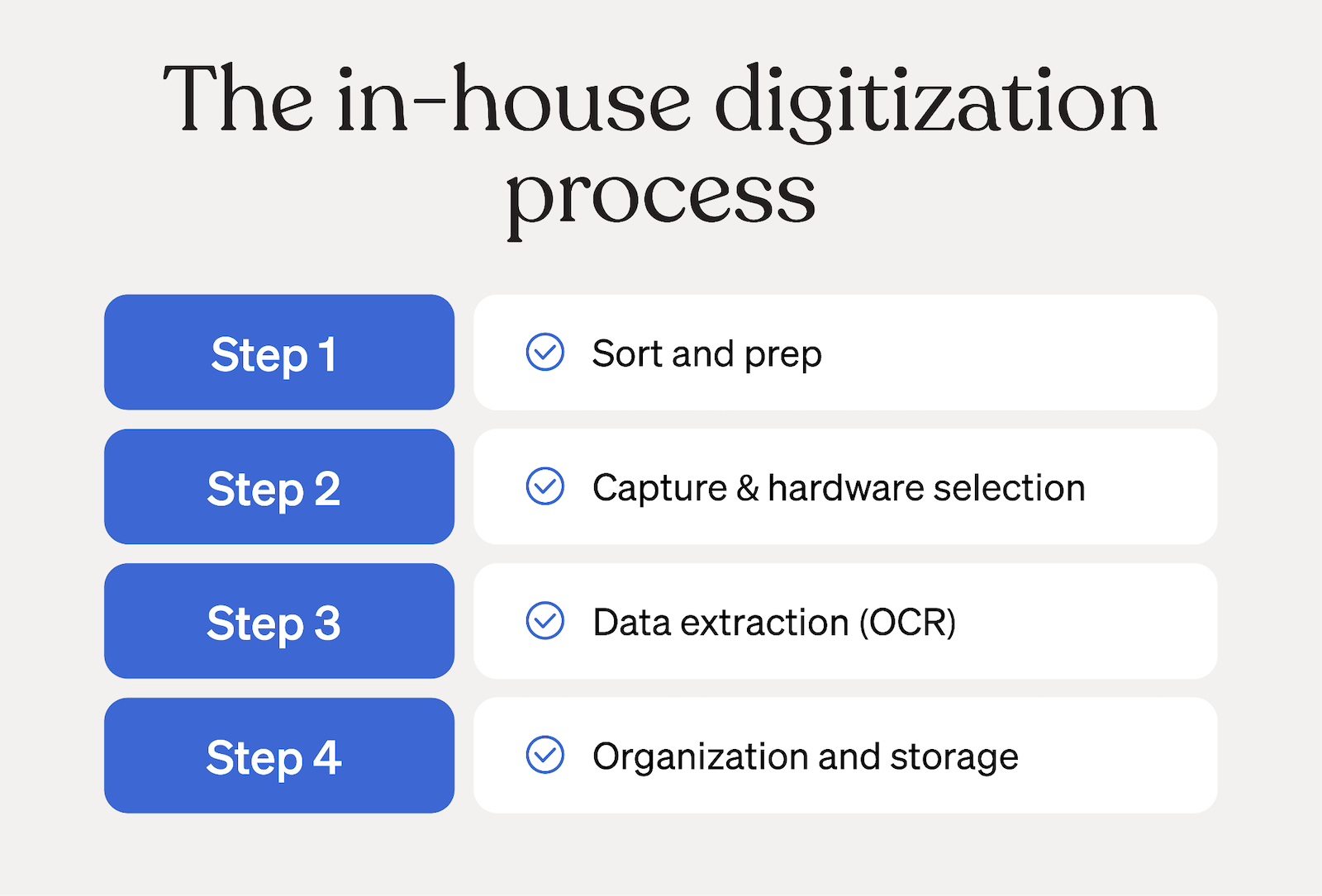
Step 1: Sorting and prepping
After receiving physical mail, the first thing you need to do is weed out the important items. Separate any junk mail from account-related mail items, including:
- Receipts
- Payroll documents
- Bank statements
- Vendor invoices
- Mailed checks
Once you’ve got your mail sorted, you need to prepare it before you scan it. High-end scanners do an excellent job of clearly capturing mail, but there are a few things you can do to make scanning a little easier.
Start by removing any staples from mail items that contain multiple pages, and try to avoid separating pages that came from the same envelope. Staples can affect the quality of scans because they prevent the scanner from making even contact with the document.
Any documents that have been folded should be flattened out to minimize creases. This is another important step when it comes to maximizing the quality of each scan.
Step 2: Capture & hardware selection
The next step is choosing the hardware you’re going to use and scanning the documents.
Consumer scanners like the ones you’ll find at your local electronics store process lower volumes of documents, so they’re a cost-effective choice if you don’t have a lot of mail to scan.
Enterprise scanners from popular brands like Canon, Brother, and Kodak are capable of scanning more than 100 documents per minute, but the upfront cost is significantly higher.
Sheetfed scanners eliminate some of the manual work of scanning documents. Simply place a stack of flat documents with no staples in the scanner and they’ll automatically feed into the scanner.
Step 3: Data extraction (OCR)
Utilizing Optical Character Recognition (OCR) is a key part of making your digitization workflow more efficient. OCR is a technology that scans documents for images of text and converts it into actual text that can be searched and often edited.
Turning pictures of text into searchable data makes it easier for accounting teams to find specific line items and documents. Even if you have thousands of accounting-related documents, a quick search can pull up any relevant documents in a matter of seconds. This means your accounting team doesn’t have to waste time rooting through documents to find the right one.
One important note about OCR is that it’s not a universal technology in terms of quality. High-end scanners and OCR software do an excellent job of capturing text, but low-end solutions may produce less desirable results.
Step 4: Organization and storage
Digital mail is typically stored on the cloud, which means you need to choose a cloud storage provider. Ideally, you want to choose a cloud storage solution that can integrate with the tools and software you’re already using. It’s also important to consider factors like storage space, security, and ease of use.
Establish naming conventions to make sure documents are named in a consistent manner. This makes it easier for your accounting team to find what they’re looking for in a list of documents, and it makes it easy to choose a file name.
Automated digitization workflow: Connecting virtual mail to your ledger
Digitizing mail is necessary for modern businesses, but that’s only part of the picture. Mailroom automation and connecting virtual mail to your accounting software is what really streamlines accounting operations and boosts your business.
What is a digital mailroom?
A digital mailroom is an outsourced mail management service that receives physical mail, scans and uploads it, and sends notifications when you have mail to review. Scanned items are stored in a virtual mailbox so you can quickly retrieve any important mail items in perpetuity.
Using a digital mailroom means you don’t have to worry about manually receiving or sorting mail, which speeds up processing times and reduces manual effort. You don’t have to lift a finger with mailroom automation.
How virtual mail integrates with accounting software like QuickBooks & Xero
Once your mail is digitized and available in your virtual mailbox, it can integrate with your existing accounting workflow in a few ways.
Both QuickBooks and Xero support email-to-bill functionality, meaning you can forward a scanned bill or invoice directly to a custom email address associated with your accounting software, and the platform will automatically parse and log it. If your team already uses this feature, a virtual mailbox like Stable fits naturally into that workflow: your mail arrives digitized and ready to forward.
For teams that need more flexibility, Stable's API enables custom integrations, so your engineering or ops team can connect your virtual mailbox to your accounts receivable workflow in a way that fits how you already work.
Mailed checks and electronic check deposit
For businesses that still receive payment by check, physical mail is a cash flow bottleneck. Every check sitting in a mailbox is money waiting to be deposited.
Stable's electronic check deposit (ECD) lets you deposit mailed checks remotely without visiting a bank branch. When a check arrives at your Stable address, it's scanned and made available in your dashboard, where you can initiate a deposit directly (or automate all deposits). This is designed for mailed checks specifically — it's not a general payment processing or accounts receivable automation tool — but for businesses that regularly receive checks by mail, it removes a meaningful step from the accounting workflow.
The benefits of automatic mail digitization
Perhaps the biggest benefit of automatic mail digitization is the fact that it saves you so much time. Instead of manually opening mail items and scanning and uploading them, you can let Stable do the work for you. Because the whole process is automated, your mail is available quickly — often within one business day of arrival.
Mailroom automation also means you don’t have to deal with storing or shredding physical mail. You can always find recent mail items in your virtual mailbox, so you don’t waste time digging through a pile of mail to find an invoice.
Automated digital mail also benefits businesses that rely on remote work. When mail is digitized and documentation is centralized, there's one source of truth workers can rely on, regardless of where your team is located.
All of these benefits combined result in faster document turnaround times, reduced handling costs, and time savings.
How stable simplifies your accounting workflow
Optimizing your accounting workflow can save you a significant amount of time and money, and Stable makes it straightforward. With Stable, you can manage all your business mail — including state mail, legal notices, vendor invoices, and mailed checks — in one secure digital interface.
When you receive a digitized document with Stable, you can set up routing rules to automatically forward it to the right person or team — so your accounting team isn't waiting on someone else to pass along an invoice. Stable is also SOC 2 Type II and HIPAA compliant and owns and operates its own mail facilities, so sensitive financial documents are handled with the level of security your business requires.
Plus, Stable makes it easy to maintain registered agent compliance across all 50 states, Washington D.C., and Puerto Rico, without paying for a physical lease or maintaining offices in multiple locations.
Contact our sales team to learn more about how Stable can fit into your accounting workflows, how to integrate with popular accounting software like Xero and QuickBooks, and see how easy it is to get started with Stable.
Frequently asked questions
How do I digitize mail for my small business?
You can manually digitize mail by scanning and uploading it, or you can use a virtual mailbox service like Stable to automatically digitize and store incoming mail as it arrives.
What is OCR in accounting?
OCR stands for Optical Character Recognition, a technology that scans images for text and converts them into searchable, editable documents. This makes it significantly faster to locate specific invoices, statements, or line items across large volumes of scanned mail.
Is a virtual mailbox secure for sensitive financial documents?
Yes, but not all virtual mailboxes are equal. Stable is SOC 2 Type II and HIPAA compliant, meaning it meets rigorous standards for data security and privacy. Stable also owns and operates its own mail processing facilities rather than outsourcing to third parties, which gives businesses an additional layer of control over how their documents are handled.
Can Stable deposit mailed checks?
Yes. Stable's Electronic Check Deposit (ECD) feature lets you deposit checks that arrive at your Stable address remotely, without a bank visit. This applies to checks received by mail. It's not a general payment processing tool, but for businesses that regularly receive mailed payments, it removes a meaningful step from the accounting workflow.