
A virtual mailroom gives law firms a secure commercial address, instant digital access to legal correspondence, and the compliance infrastructure to operate without a physical mailroom — at a fraction of the overhead.
As remote work grows and overhead costs climb, many attorneys now run their practices without a dedicated mailroom. A virtual mailbox gives law firms a secure commercial address, professional mail scanning, and digital document access, all without leasing extra square footage or hiring staff to sort envelopes.
Key takeaways
- Virtual mailrooms replace physical mailrooms with a secure address, mail scanning, and digital access for distributed legal teams.
- Law firms can stay compliant with ABA and state bar rules by choosing a virtual mailbox provider that offers a real street address and proper service of process handling.
- Cloud-based mail management reduces overhead costs, improves document security, and supports business continuity for solo practitioners and large practices alike.
Why traditional law firm mailrooms are becoming obsolete
The traditional in-house mailroom made sense when everyone worked in the same office. That model no longer fits how law firms operate today. Distributed teams, flexible work arrangements, and tightening budgets are pushing firms toward leaner infrastructure solutions.
The hidden costs of a physical mailroom
A physical mailroom carries expenses that rarely show up as a single line item, such as:
- Office square footage expenses: Mailroom space adds directly to your monthly rent. In major legal markets, that cost per square foot compounds quickly.
- Staffing and manual sorting: Hiring or assigning staff to receive, sort, log, and distribute physical mail is expensive and time-consuming.
- Delays and inefficiencies: Physical mail sits until someone processes it.
- Risk of lost or mishandled legal mail: Physical documents can be misfiled, lost, or delivered to the wrong person.
The rise of the remote and hybrid law firm
Several trends have accelerated the move away from fixed office infrastructure.
- Growth of distributed legal teams: Attorneys now routinely work across multiple cities and states. Firms need infrastructure that functions regardless of where team members are located.
- Increased adoption of cloud-based practice management tools: Platforms like Clio, MyCase, and others have normalized digital-first workflows.
- Shift toward flexible infrastructure: Firms are replacing fixed costs with scalable services.
What is a virtual mailroom for law firms?
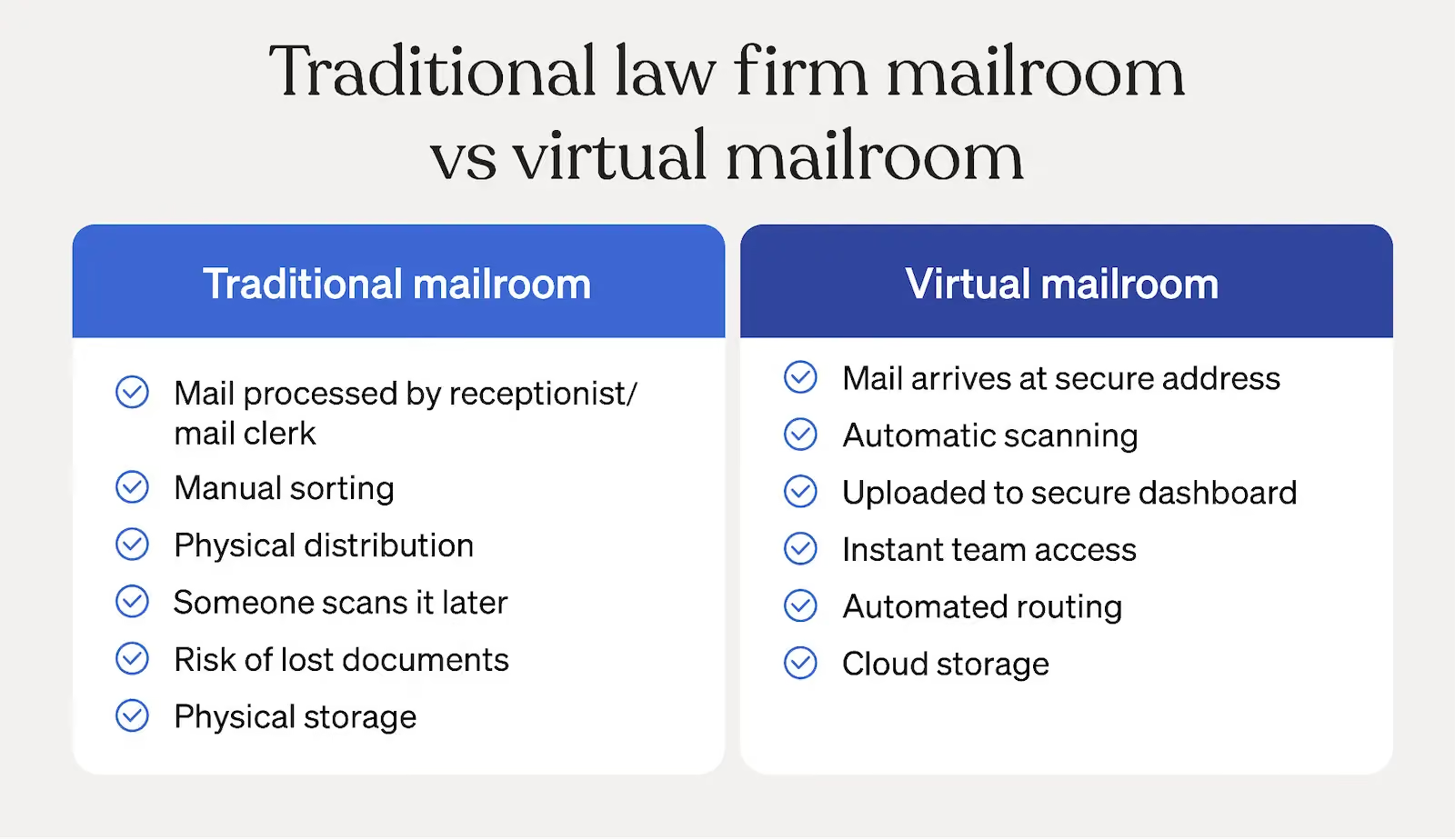
A virtual mailroom gives law firms a real commercial address and handles all incoming mail digitally.
Definition and core functions
A virtual mailroom is a third-party service that acts as your firm's physical mailing address and mail processing center. The core functions include:
- Receiving mail and packages at a secure commercial address
- Scanning and digitizing all incoming legal correspondence
- Providing access through a secure online dashboard for your team
- Offering mail forwarding, shredding, check deposit, digital storage, and temporary physical storage options
- Using AI and automation to categorize mail, route documents to the right team members, and trigger workflows
How virtual mail differs from a PO Box
A PO Box and a virtual mailbox are not interchangeable.
- Real street address: A PO Box alone often does not satisfy business address requirements under many state bar rules. A virtual mailbox provides a real commercial street address that meets professional requirements.
- Professional image: A commercial address signals credibility to clients, courts, and opposing counsel in a way that a PO Box does not.
- Multi-user access: Your entire team can view, route, and act on incoming mail simultaneously through a shared online dashboard.
- Integration with digital workflows: Virtual mailrooms connect with case management platforms, cloud storage, and document systems. A PO Box requires someone to physically retrieve and scan everything manually.
How modern law firms handle mail without a mailroom
Modern law firms replace the traditional mailroom with a coordinated set of digital processes.
1. Centralized business address
Your firm designates one commercial address through your virtual mailbox provider. This address can serve as your official business location for bar registration, court filings, and client correspondence. Stable offers a range of locations so you can maintain a professional presence wherever your practice requires it.
If your firm operates as an LLC, note that a virtual mailbox and a registered agent service serve different functions. A registered agent must be available during business hours at a physical address in each state to accept service of process on behalf of the entity. Stable offers registered agent services in all 50 states, Washington D.C., and Puerto Rico, so firms can manage both needs through a single provider.
2. Secure mail scanning and digitization
Your virtual mailroom provider immediately scans incoming, typically within one business day. Scanned documents are delivered to your dashboard with encryption in transit and at rest. Your team can access the content instantly, regardless of where team members are located.
3. Automated routing and document management
Advanced virtual mailroom platforms allow you to set rules that automatically route specific documents to the right people or workflows. Built-in tagging, notifications, and internal routing features help ensure the appropriate team members see important mail without manual sorting.
Through integrations, APIs, or webhooks, mail data and documents can also be sent to the other systems your firm relies on, such as cloud storage platforms, case management software, or designated folders, helping connect incoming mail to the rest of your operational workflows.
4. Compliance and record retention
Your virtual mailroom creates an auditable record of every piece of mail your firm receives. Retention policies determine how long digital copies are stored, and secure shredding handles physical documents after scanning. Audit trails and timestamped records support your firm's compliance obligations and protect you in the event of a dispute over document receipt.
Compliance, ethics, and confidentiality considerations
Legal mail contains sensitive personal information and your virtual mailroom provider must be equipped to handle it accordingly.
Maintaining attorney-client confidentiality
Legal documents routinely contain personally identifiable information (PII) and attorney-client privileged communications that require the highest levels of protection. Look for SOC 2 Type II certification as a baseline, and HIPAA compliance if your practice handles healthcare-related matters.
Your virtual mailroom provider must operate secure facilities where physical mail is handled only by vetted staff. Digital delivery should use encrypted channels, and access to scanned documents should require authentication. Role-based access controls inside your dashboard let you limit which team members can view sensitive correspondence.
ABA and state bar considerations
State bar rules and attorney registration requirements often require lawyers to maintain and list a current business address. A virtual mailbox with a commercial street address generally satisfies these requirements, though attorneys should confirm the specific rules for each state where they are licensed. Additionally, courts and opposing counsel need a reliable address where legal documents will be received and acted upon promptly.
Chain of custody and legal mail tracking
A virtual mailroom creates a verifiable record for every piece of incoming mail. Audit logs capture who accessed each document. Delivery confirmations establish that your firm received a specific item on a specific date. Timestamped digital records provide the kind of documentation that protects your firm if a dispute arises over whether a deadline was met or a notice was received.
Key benefits of using a virtual mailroom for your law firm
Switching to a virtual mailroom delivers advantages across cost, speed, security, and operational flexibility.
1. Reduced overhead costs
- Lower rent: You no longer need office space dedicated to receiving and processing mail.
- No dedicated mail staff: The provider handles all mail intake, scanning, and sorting.
- Scalable pricing: Most virtual mailroom services charge based on volume, so costs scale with your firm rather than locking you into fixed overhead.
2. Faster mail processing
- Same-day scanning: Incoming mail is typically processed the day it arrives.
- Instant team access: Every attorney and staff member with appropriate permissions can view new mail the moment it is scanned.
3. Improved security and risk reduction
- Reduced internal handling: Fewer people touch your physical mail, which reduces the risk of misfiling, unauthorized access, or accidental disclosure.
- Secure storage: Physical documents are stored in controlled facilities, and digital copies are encrypted.
4. Geographic flexibility
- Attorneys working from multiple states: Your team can work from anywhere and still access all incoming correspondence instantly.
- Expansion without physical office leases: Opening a presence in a new market no longer requires signing a lease and staffing an office.
5. Business continuity
- Disaster resilience: If your office becomes inaccessible due to a natural disaster, power outage, or other disruption, your mail operations continue unaffected.
- No dependency on physical access: Because everything is digital, your firm keeps functioning no matter what happens to the physical location.
How Stable supports the modern law firm
Stable is built for law firms that take mail seriously. Firms get a secure commercial address for receiving mail along with a digital platform for managing it, featuring same-day mail scanning, encrypted delivery, and workflow automation that connects with the tools their teams already use.
Explore case studies from firms that have already made the transition, or contact our sales team to discuss what a virtual mailroom setup would look like for your practice.
Ready to move forward? Get started today.
Frequently Asked Questions
Is virtual mail secure enough for legal documents?
Yes, provided you choose a provider with the right certifications. Look for SOC 2 Type II compliance as a baseline. This certification confirms that the provider has undergone an independent audit of its security controls. For healthcare law matters, HIPAA compliance is an additional consideration.
Can courts send documents to a virtual address?
Courts and opposing counsel can send legal documents to your virtual mailbox address because it is a real commercial street address, not a PO Box. That said, service of process requirements vary by jurisdiction. Some states require that an attorney or registered agent physically present at an address accept service during business hours. For those requirements, Stable's registered agent service provides coverage across all 50 states, D.C., and Puerto Rico.
What happens to original legal documents?
After your virtual mailroom scans incoming mail, the provider stores the physical originals for a temporary period of time, which differs from provider to provider. Most platforms allow you to request forwarding of originals to any address you choose. Documents you no longer need can be securely shredded, with a confirmation record added to your audit log.